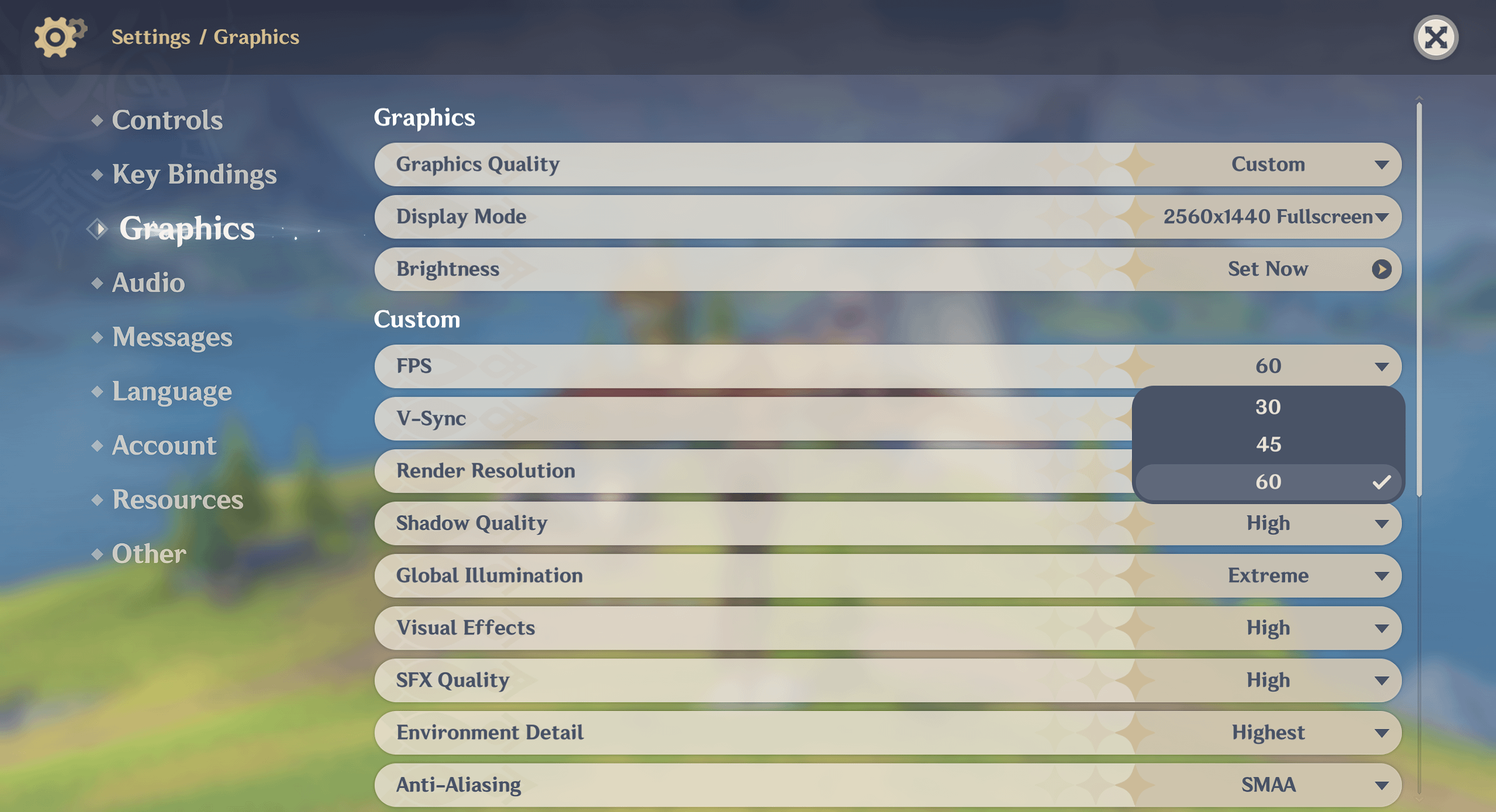
When we get an Unlimited FPS option on Genshin Impact?, it's been Five Years man :(
I create ticket for this question but they giving me bullshit answers :((
Commentaires
babangelsin2026-01-03 20:53
Around the same time we get a skip button I reckon
SoC1752026-01-03 20:53
Whenever Apple's exclusive deal has run out
La-Roca992026-01-03 20:57
Customer support only knows what Customer Support is allowed to
A contracted deal with Apple doesnt fall inside that knowledge, otherwise it makes no sense why Apple devices only have it
overtitans2026-01-03 20:59
you mean they can't active a single option just for contract?
Ordinary_Divide2026-01-03 21:13
yes
overtitans2026-01-03 22:01
it's very funny lmao 🤣🤣
La-Roca992026-01-03 21:44
Thats how exclusivity contracts work yes
And Hoyo even went all in to explain it on Year 1 during Zhongli's 1st SQ
notcreative2ismyname2026-01-03 20:57
Never
External_Cucumber932026-01-03 21:00
Why would you ever wanna uncap and dedicate your entire machine to Genshin? Thats what uncapping does. You’re just shooting yourself in the foot. Uncap is only good for low ms games, which are mostly just rhythm games
FreeKill4082026-01-03 21:10
Me when i have no idea what im talking about
External_Cucumber932026-01-03 21:14
When you uncap, your machine will try and use up all your GPU, when it does that your CPU will try to keep up with your GPU. You’ll end up nearly 100% utilizing both your CPU and GPU.
You’re the one who doesn’t know shit. Fucking moron
NoctiferPrime2026-01-03 21:20
And many people do not care about that, because their machines can handle it and it means smoother and more comfortable gameplay, you buffoon.
FreeKill4082026-01-03 21:24
Have you ever played games on pc before? You make it sound like my gpu and cpu will explode if i play games at uncapped fps. Your pc will adjust the amount of resources needed for everything dynamically, if i have a game running at uncapped fps and open a browser it will adjust and allocate cpu/gpu/ram so that everything runs normally. Genshin isnt even a heavy game to run so its not even a problem anyways
There are tons of benefits of having more than 60 fps, everything feels more fluid and responsive at higher fps, especially if you have a higher refresh rate monitor.
Thanks for calling me moron though, made me really laugh at how heated you got by a single sentence.
External_Cucumber932026-01-03 21:29
Nothing personal, so don’t flatter yourself. All dumb people get me heated
FreeKill4082026-01-03 21:30
So instead of actually writing something to prove your point you double down by calling me stupid lmao
External_Cucumber932026-01-03 21:37
Blocked.
NoctiferPrime2026-01-03 22:25
Imagine going out of your way to tell someone you've blocked them because you made yourself look like an idiot and have no real argument against any point they've made.
10/10 my guy.
real_fake_cats2026-01-03 22:11
Exactly. That's also why you should only play games on the lowest strings, at 480x640.
Gotta save that processing power for...uh...why don't we want to use our PCs to their full capabilities again?
PedroMori2026-01-03 22:20
bro has never tried an high refresh rate monitor
Nexius_2026-01-03 23:12
this is one of the comments ever
overtitans2026-01-03 21:00
For AMD users, there is option called Frame Motion Fluid to double the current Fps.
dragosslash2026-01-03 22:26
Lossless Upscaling works on all hardware.
proxy19c2026-01-03 22:44
Any idea if it exists for Nvidia?
issm2026-01-04 00:10
Smooth Motion in the Nvidia App. Currently requires 40 series or newer.
Be aware that frame generation tricks like this is not the same as real 120FPS.
Frame generation works by taking the current frame and *the next frame*, and calculating what the frame that would have gone in between then *should* have looked like.
Calculating the in between frame and showing you that before showing you the next frame is obviously going to take longer than just showing you the next frame, so turning frame generation on *always* increases input latency - the game will feel laggier.
Also, because the frame is being interpolated from two complete frames, and not being rendered from the 3d models, the in between frame will end up with visual artifacts. For example, if you look at [this image from Hardware Unboxed/Techspot](https://www.techspot.com/articles-info/2945/images/2025-01-27-image-3-j_1100.webp), you can see that in the rendered frame, the grid on the floor is clean and regular, but when Frame Gen is enabled, you can see lines being generated in the middle of the pattern, or lines getting cut off.
How sensitive you are to these issues is a personal issue, but those issues will always be there.
The other option is Lossless Scaling. The benefit is, it works on any GPU. The downsides (compared to a first party solution like Smooth Motion or AFMF) is that the visual artifacts will be worse. The first party solutions running in the driver have the advantage that they're inside the normal rendering process, so, for example, they know where objects in the scene are moving, and they can use that information to generate a more accurate image. Lossless Scaling is a filter that is applied after all of the rendering is done, and so can't correct it's output like that.
proxy19c2026-01-04 16:23
Yeah it's pretty shit actually, I tried it on my RTX 4070 with 1440p screen, it works yes, it's smooth, no input lag actually, but the screen tearing is really bad and annoying, I guess DLSS isn't a good enough solution for 60 fps locked game, although it worked flawlessly in Arc Raiders. I'm definitely not going to use any weird ass random GitHub fps unlocker, no matter how many people claim it's safe to use, just wanted to try driver level solution, unfortunately it seems to be not worth it. Maybe it's better on AMD, I've heard recent FSR is pretty good.
_MaidOfGarbage2026-01-03 21:01
use an fps unlocker. mine's at 120
Ordinary_Divide2026-01-03 21:12
you can be banned for that
hisai962026-01-03 21:15
[deleted]
Ordinary_Divide2026-01-03 21:20
ive heard people say they got banned specifically because of that in a ban wave a few months back
CountLost3622026-01-03 21:15
Don't spread misinformation.
Flo_Yolo2026-01-03 22:34
Don't spread misinformation.
Objective-critic2026-01-25 05:10
Been using it since fontaine, no issues at all. People are just too scared because of their fallacy of sunk costs.
Ikses2026-01-03 21:26
this is cost of being able to play on phone, never happening
overtitans2026-01-03 22:02
zenless zone zero is not like this.
Elysium_Chronicle2026-01-03 22:55
Genshin came out before Hoyo had any bargaining power.
MyDearMonarch2026-01-03 21:33
Because an agreement is made with apple. Now you know.
Live_Emu_6382026-01-03 21:41
You can actually use your NVDIA or AMD Graphics Card AI Frame Gen setting for any game and it will double to 120 and IS NOT against TOS since its LITERALLY just your graphics card doing what its designed for and not some third party app that is detectable. Though I do also use Lossless Scaling from steam for more than a year now and never got a warning or a ban but switched to the one on my graphics card just in case.
issm2026-01-03 23:46
"AI" frame gen increases latency and introduces graphical artefacts.
Using fake frames isn't a good solution when my GPU is sitting there at 30% utilization under the 60FPS cap, and I can easily get 120 (or way more) high quality, low latency real frames, if Mihoyo would remove their artificial limitation.
Live_Emu_6382026-01-04 09:17
I get that but do you really care about latency in Genshin of all games? I totally understand that for competitive shooters but for an exploration game you won't even notice it. Your ping is literally a bigger latency, than what latency AI frame Gen will add. Maybe if you care about tryharding Stygian to min max your rotations I could also get. I agree 100% that fake frames shouldn't be a thing cause it makes game companies lazy with game optimization but it gets the job done for now even with these minor flaws, until Mihoyo finally uncaps the frame limit. So no reason to not use it really, I will gladly sacrifice 10-20ms latency and some artifacts here and there for double the fps.
issm2026-01-04 10:40
Input latency just feels bad regardless of competitiveness. I had some input latency when I was playing Horizon Zero Dawn that got so bad it would literally make me nauseous after a little while - Game didn't like my RAM configuration, apparently, went away after I added 2 more sticks.
Doesn't bother you? Great. But the penalty is there.
> Your ping is literally a bigger latency
Those are two different issues.
Genshin doesn't check in with the server for every single input; most movement related things are handled client side and only acknowledged server side. In Genshin, it's mainly just damage calculations, energy calculations, and inventory actions that need to happen server side.
Even in games where movement does happen server side, the client typically doesn't wait for the server to ok the movement before animating and rendering the move - that's why rubberbanding happens. Because the game moves you before getting a response from the server (if even required) network latency has zero impact on input latency.
Frame generation, on the other hand, will affect that, since frame generation increases the time it takes to render the frame.
> I will gladly sacrifice 10-20ms latency and some artifacts here and there for double the fps
If the drawbacks don't bother you, then good for you.
> Though I do also use Lossless Scaling from steam for more than a year now
Also going to respond to this since I just saw it:
Safety doesn't even matter. If you have access to DLSS or FSR frame gen, you should always use that, and ignore Lossless Scaling, because DLSS/FSR is just better.
It is literally not possible for Lossless Scaling to do better than the first party solutions.
LS is a postprocessing filter, while DLSS and FSR run inside the normal render pipeline.
This means, DLSS and FSR can do their thing before the UI gets added on top, while LS needs to frame gen after the UI is already drawn in, which means LS will generate artifacts around the UI, while DLSS/FSR won't.
Furthermore, DLSS and FSR have access to the game's internal data, and, as a result, they can know where objects in the frame are moving, and use that to correct their generated frames. Lossless Scaling, being, again, a postprocessing filter, does not have any of that data, and can't make corrections, resulting in more artifacts.
Live_Emu_6382026-01-04 11:09
Yep
dragosslash2026-01-03 22:27
I keep asking them in every survey. Hopefully we'll see it some day.
Commentaires
A contracted deal with Apple doesnt fall inside that knowledge, otherwise it makes no sense why Apple devices only have it
And Hoyo even went all in to explain it on Year 1 during Zhongli's 1st SQ
You’re the one who doesn’t know shit. Fucking moron
There are tons of benefits of having more than 60 fps, everything feels more fluid and responsive at higher fps, especially if you have a higher refresh rate monitor.
Thanks for calling me moron though, made me really laugh at how heated you got by a single sentence.
10/10 my guy.
Gotta save that processing power for...uh...why don't we want to use our PCs to their full capabilities again?
Be aware that frame generation tricks like this is not the same as real 120FPS.
Frame generation works by taking the current frame and *the next frame*, and calculating what the frame that would have gone in between then *should* have looked like.
Calculating the in between frame and showing you that before showing you the next frame is obviously going to take longer than just showing you the next frame, so turning frame generation on *always* increases input latency - the game will feel laggier.
Also, because the frame is being interpolated from two complete frames, and not being rendered from the 3d models, the in between frame will end up with visual artifacts. For example, if you look at [this image from Hardware Unboxed/Techspot](https://www.techspot.com/articles-info/2945/images/2025-01-27-image-3-j_1100.webp), you can see that in the rendered frame, the grid on the floor is clean and regular, but when Frame Gen is enabled, you can see lines being generated in the middle of the pattern, or lines getting cut off.
How sensitive you are to these issues is a personal issue, but those issues will always be there.
The other option is Lossless Scaling. The benefit is, it works on any GPU. The downsides (compared to a first party solution like Smooth Motion or AFMF) is that the visual artifacts will be worse. The first party solutions running in the driver have the advantage that they're inside the normal rendering process, so, for example, they know where objects in the scene are moving, and they can use that information to generate a more accurate image. Lossless Scaling is a filter that is applied after all of the rendering is done, and so can't correct it's output like that.
Using fake frames isn't a good solution when my GPU is sitting there at 30% utilization under the 60FPS cap, and I can easily get 120 (or way more) high quality, low latency real frames, if Mihoyo would remove their artificial limitation.
Doesn't bother you? Great. But the penalty is there.
> Your ping is literally a bigger latency
Those are two different issues.
Genshin doesn't check in with the server for every single input; most movement related things are handled client side and only acknowledged server side. In Genshin, it's mainly just damage calculations, energy calculations, and inventory actions that need to happen server side.
Even in games where movement does happen server side, the client typically doesn't wait for the server to ok the movement before animating and rendering the move - that's why rubberbanding happens. Because the game moves you before getting a response from the server (if even required) network latency has zero impact on input latency.
Frame generation, on the other hand, will affect that, since frame generation increases the time it takes to render the frame.
> I will gladly sacrifice 10-20ms latency and some artifacts here and there for double the fps
If the drawbacks don't bother you, then good for you.
> Though I do also use Lossless Scaling from steam for more than a year now
Also going to respond to this since I just saw it:
Safety doesn't even matter. If you have access to DLSS or FSR frame gen, you should always use that, and ignore Lossless Scaling, because DLSS/FSR is just better.
It is literally not possible for Lossless Scaling to do better than the first party solutions.
LS is a postprocessing filter, while DLSS and FSR run inside the normal render pipeline.
This means, DLSS and FSR can do their thing before the UI gets added on top, while LS needs to frame gen after the UI is already drawn in, which means LS will generate artifacts around the UI, while DLSS/FSR won't.
Furthermore, DLSS and FSR have access to the game's internal data, and, as a result, they can know where objects in the frame are moving, and use that to correct their generated frames. Lossless Scaling, being, again, a postprocessing filter, does not have any of that data, and can't make corrections, resulting in more artifacts.