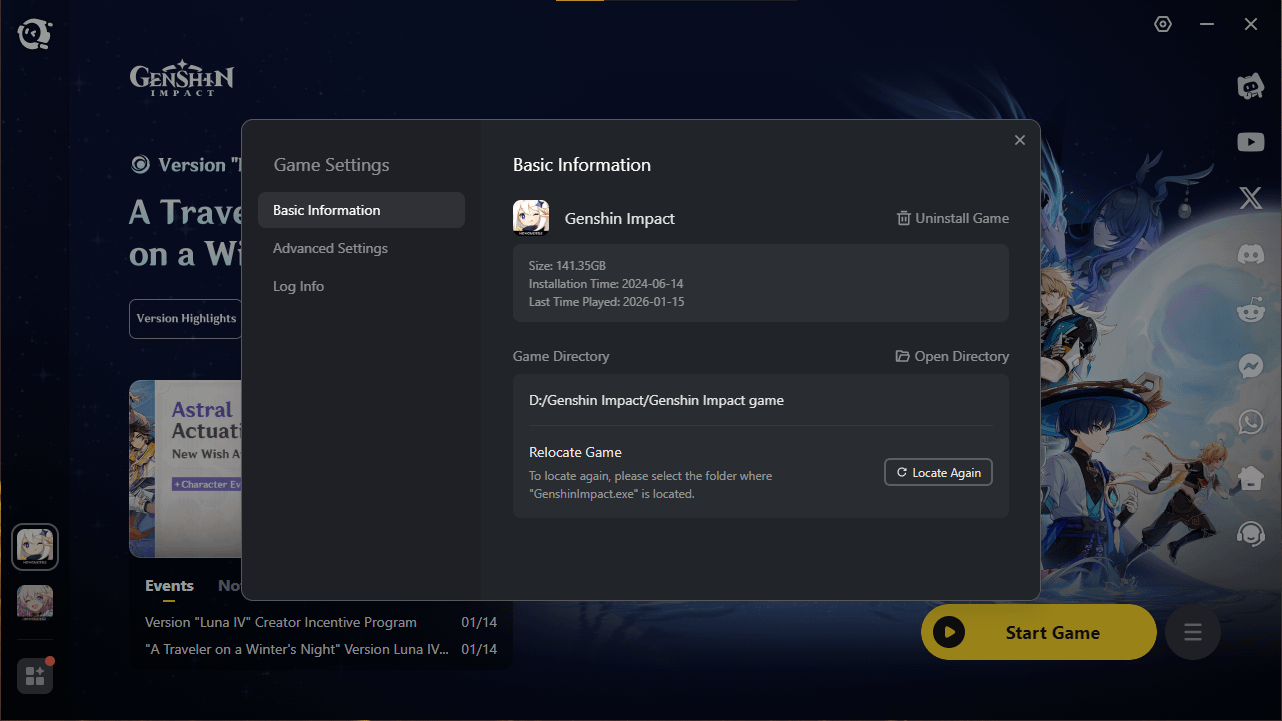
140+ GB after new update. Is there any way to optimize this? Even HSR has options to delete old and no longer used resources.
Commentaires
AnnihilationBoom1232026-01-14 22:06
Would a complete reinstall help? It sort of does cut some gigabyte or two in android if done so
Lhect-092026-01-15 00:52
Yes, probably.
The_last_Human__2026-01-14 22:13
same bro mine's like 165 fuckin gigs wut da helly
Sharp_Exercise_98762026-01-14 22:22
Clean install would likely get it a little bit down. I have 130GB right now, which includes second set of voice-over files.
Lhect-092026-01-15 00:54
Yes, but downloading all those things again simply not worth it.
issm2026-01-15 07:36
By the way, you can "clean install" without downloading literally everything again.
1) Go to your Genshin folder and find [Genshin install path]/GenshinImpactData/StreamingAssets/
2) Copy/move that entire folder (StreamingAssets) somewhere else to back it up. Also back up any screenshots, if you have them, located in ([Genshin Install Path]/ScreenShot)
3) Uninstall Genshin, deleting all files
4) Reinstall Genshin, but as soon as it creates the folder for Genshin, stop the download.
5) Copy the backed up StreamingAssets folder into the newly created Genshin folder, ensuring you keep the file structure intact (i.e., the path to the folder is still [Install Path]/GenshinImpactData/StreamingAssets)
6) Resume download. StreamingAssets is the vast majority of the game's necessary bulk. The rest of the client should only be 4-GB.
Lhect-092026-01-15 12:01
Good advice. Already try this method before, but the StreamingAssets itself is 137 GB so it didn't change anything.
issm2026-01-15 23:23
If StreamingAssets is 137GB, that sounds like you have an extra language pack installed.
If there are temp files, they won't be in there - unless you play UGC and it saves stuff there.
issm2026-01-14 23:31
Do you have multiple language packs or something?
My install is only 117GB.
But even then, Mihoyo could easily reduce total file size by ~17GB for new players (video assets for the opposite sex traveler), and an additional ~17GB for players who've finished all main and character quests.
Lhect-092026-01-15 00:57
Yeah, they must been reducing the size for newly installed ones. But Mihoyo just didn't give options for old players to reduce those old unused files.
issm2026-01-15 01:02
There are files you can manually delete. I deleted like, 5GB worth of files named "generated soundbanks" a while back, and you can manually delete the video cutscenes.
That's what programs like Wiztree are useful for. They visually show you what's taking up space. Find big blocks of files, and if they don't look important, delete them. You can run a file repair if you want to be sure you didn't delete anything important (but obviously, don't do that if you delete the videos, since the game will just redownlaod all the videos).
Lhect-092026-01-15 01:10
Good idea.
Viciant2026-01-15 03:44
i have 2022 install i have option to delete other language packs how come you dont?
Lhect-092026-01-15 05:13
Nobody say anything about deleting other language packs. I didn't even downloaded that.
Commentaires
1) Go to your Genshin folder and find [Genshin install path]/GenshinImpactData/StreamingAssets/
2) Copy/move that entire folder (StreamingAssets) somewhere else to back it up. Also back up any screenshots, if you have them, located in ([Genshin Install Path]/ScreenShot)
3) Uninstall Genshin, deleting all files
4) Reinstall Genshin, but as soon as it creates the folder for Genshin, stop the download.
5) Copy the backed up StreamingAssets folder into the newly created Genshin folder, ensuring you keep the file structure intact (i.e., the path to the folder is still [Install Path]/GenshinImpactData/StreamingAssets)
6) Resume download. StreamingAssets is the vast majority of the game's necessary bulk. The rest of the client should only be 4-GB.
If there are temp files, they won't be in there - unless you play UGC and it saves stuff there.
My install is only 117GB.
But even then, Mihoyo could easily reduce total file size by ~17GB for new players (video assets for the opposite sex traveler), and an additional ~17GB for players who've finished all main and character quests.
That's what programs like Wiztree are useful for. They visually show you what's taking up space. Find big blocks of files, and if they don't look important, delete them. You can run a file repair if you want to be sure you didn't delete anything important (but obviously, don't do that if you delete the videos, since the game will just redownlaod all the videos).