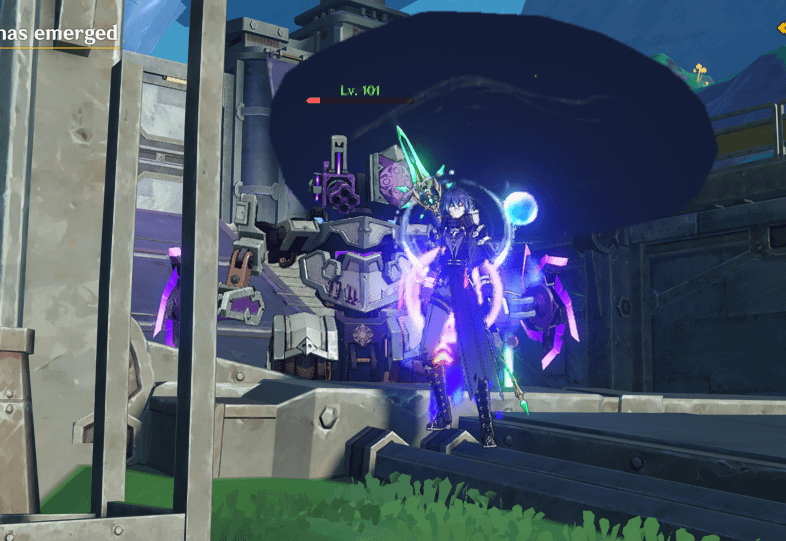
Hi, does anyone know how to fix this ominous cloud that keeps appearing for any Lunar reactions?
I've had this thing eversince the Nod Krai update and I don't really know how to fix it. Thanks!
Commentaires
Elysium_Chronicle2026-01-26 07:23
That's what Lunar-Charged does, is create a stormcloud that follows enemies.
Your graphics settings are probably quite low for it to look like *that*, however.
Pretend_Sky58162026-01-26 07:45
it's the same thing even after i adjusted my graphics to a higher level.
A_Noelle_Main2026-01-26 12:45
It's probably the graphics card that's causing that. Even on low settings, it shouldn't looked like that.
ahmadalhuraibi2026-01-26 07:24
upgrade your devices
Pretend_Sky58162026-01-26 08:29
I would do that if all of our country's politicians would give me a dollar as a charity
Shahadem2026-01-26 08:13
Use a rpg to shoot down the "weather balloon".
The_closet_iscomfy2026-01-26 12:44
Click "Repair Files" in the settings, from the rest of the screen there's no reason for the cloud to look like that when the rest of your game looks good
Pretend_Sky58162026-01-26 12:51
I've already did that before too. I might have to just play the game with that ominous cloud I guess. But I'll try repairing it again probably
Kvendy_2026-01-27 00:09
Maybe the gpu drivers needs updates what's your gpu. Also try to put the game on the highest settings and then restart it to see if the problem exists.
Commentaires
Your graphics settings are probably quite low for it to look like *that*, however.